SSL/HTTPS for your website

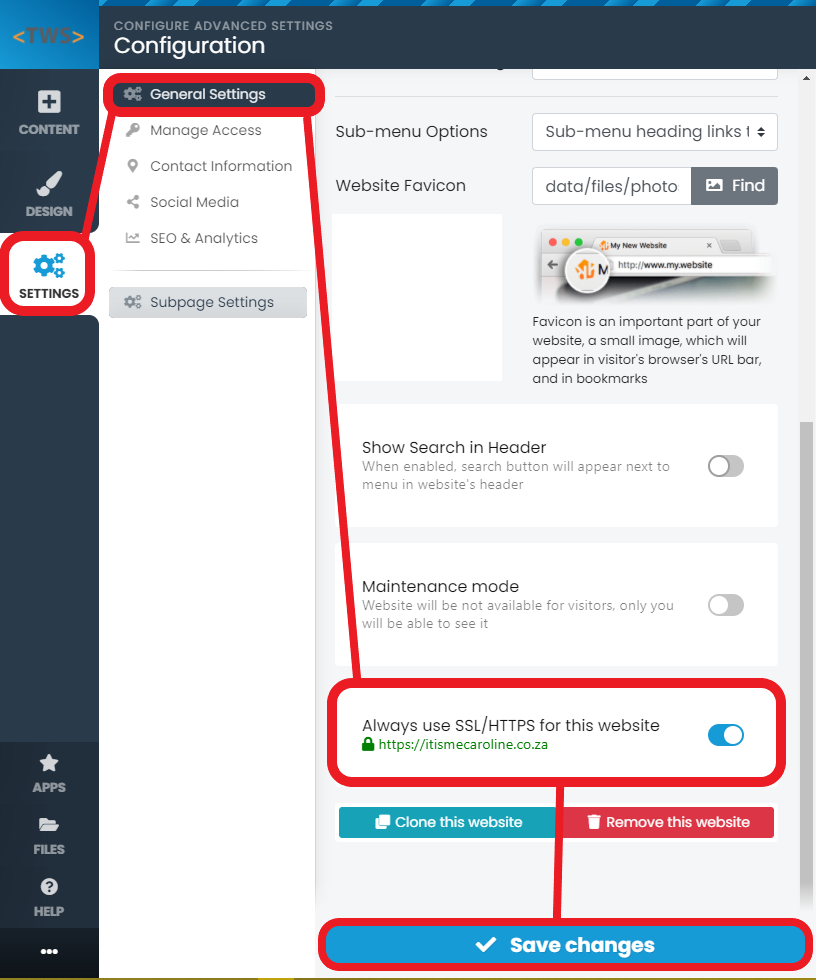
Once you are logged into your Website Builder you will see the Settings icon on the top left side of the menu. Here you will find the General Settings option.

SSL Help

Under General Settings you will find the option to select Always use SSL/HTTPS for this website. If you have any trouble with SSL/HTTPS please contact us for assistance. 
SSL Help

  • 0 Users Found This Useful
Was this answer helpful?

Related Articles

Block Settings - Resizing

Once you are logged into your Website Builder you can select a block and there you will see an...

Introduction Video

Once you are logged into your Website Builder you will see help icon on the left bottom side of...

Adding a Video

Once you are logged into your Website Builder you will see a content icon on the top left side of...

Change Website Favicon

Once you are logged into your Website Builder you will see the settings icon on the top left side...

Change Your Open Graph Image

Once you are logged into your Website Builder you will see the settings icon on the top left side...